Last updated: 26 June 2026 · Status: Preview / pre-launch
If you want to learn how to use Seedance 2.5, start with one fact: it isn’t fully public yet. ByteDance unveiled the model on 23 June 2026 at its Volcano Engine FORCE conference, with a public launch targeted for early July 2026 — it’s in enterprise beta now. The headline upgrades are real, though: native 30-second clips and up to 50 multimodal reference inputs, roughly four times Seedance 2.0’s 12-input system. This guide walks you through accessing it, choosing a mode, writing prompts, and dialing in settings. If you’re building this into a product and want to swap video models (or LLMs) without rewriting integrations, an AI gateway like OrcaRouter gives you one endpoint across providers — including Seedance 2.5.
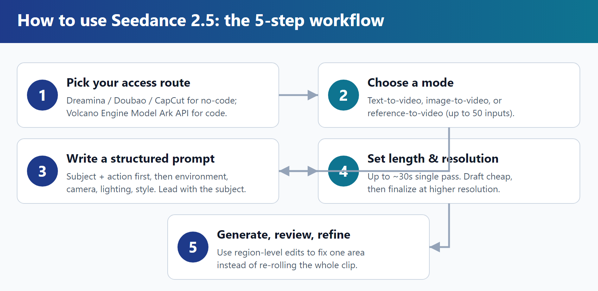
Quick take: Beginners should generate through Dreamina, Doubao, or CapCut (no code); developers should use Volcano Engine’s Model Ark API. Whatever the route, the workflow is the same: pick text-, image-, or reference-to-video, write a structured prompt (subject and action first), set length and resolution, generate, then refine with region-level edits instead of re-rolling.
The end-to-end Seedance 2.5 workflow, from access route to final clip. Spec figures source: digitalApplied, The Next Web (vendor-reported preview).
Step 1: Where to access Seedance 2.5
There are two practical paths, and which one you pick depends on whether you write code.
No-code (easiest for beginners). ByteDance ships its video models through consumer creation apps. Seedance 2.5 will be available across Dreamina, Doubao, and CapCut. For Seedance 2.0 today, the flow is representative: sign up at Dreamina, open the AI Video section, pick the model from the dropdown, and you’re generating in under two minutes — with daily free credits that reset every 24 hours.
API (for developers). ByteDance’s first-party route is Volcano Engine’s Model Ark API; new BytePlus accounts get free starter tokens. After launch, expect third-party aggregators — fal, Replicate and similar providers that already host Seedance 2.0 — to add 2.5 once it ships. These wrap the model in a clean REST/SDK interface and bill in USD.
⚠️ Availability caveat: Because 2.5 is still preview/beta, access routes, prices, and even some specs (native 4K for 2.5 specifically is reported but not yet confirmed) can change at launch. Confirm against each platform’s official docs before committing.
See also: Essential Tech Gadgets to Help Nursing Students Stay Organized and Focused
Step 2: Choose your generation mode
Seedance 2.5 supports three input modes. Match the mode to your starting material.
| Mode | You provide | Best for |
| Text-to-video | A written prompt only | Concepts and ideation from scratch |
| Image-to-video | A start frame (+ prompt) | Animating a specific look or shot |
| Reference-to-video | Up to 50 images, video, audio, style refs | Keeping a product, character, or brand consistent |
The 50-reference system is the feature most likely to matter for commercial work: feed it images of your product or mascot and it stays identical across a whole campaign, which short-clip stitching never managed reliably.
Step 3: Write an effective prompt
Prompt quality is the single biggest lever you control. Seedance’s own guidance points to a clear formula: Subject + Action + Environment + Camera + Lighting + Style. The order matters because the first 20-30 words carry the most weight — the model locks in the subject and core action before it processes the rest.
Lead with subject and action, then layer in environment, camera, lighting, and style. Source: inVideo Seedance prompt guide.
Practical rules drawn from the Seedance prompt guide:
- Lead with who or what is in frame, then what they’re doing. Save style and atmosphere for later.
- One verb, present tense, one movement per shot. “Walks slowly,” not three competing actions.
- Lighting is your top quality dial. If you add one element, add a lighting description.
- Use one primary camera instruction and pacing words (“slow,” “smooth”) over technical jargon.
- Cut adjective stacking to one strong word; clarity beats intensity. Aim for roughly 50-100 words.
Step 4: Use references for consistency
For reference-to-video, attach your reference images or clips and tell the model what to hold constant (“keep the jacket and logo identical; change only the background”). Because 2.5 accepts up to 50 multimodal inputs — images, audio, and style references combined — you can lock a character’s face, a product’s geometry, and a brand palette in a single generation. Prefer image references over video references where quality allows; video inputs tend to cost more.
Step 5: Set length and resolution
Seedance 2.5 generates up to ~30 seconds in a single native pass, so you no longer need to stitch short clips for a continuous scene. A sensible default workflow:
- Draft at lower resolution and shorter length to iterate on prompt and composition cheaply.
- Then finalize at your target resolution and full length once the shot is right.
- Use region-level editing to fix mistakes. Seedance 2.5 can change one region, element, or subject without re-rolling the whole clip — swap a product or fix a bad frame instead of regenerating 30 seconds.
Tips for better results
- Iterate in small steps. Change one variable per generation so you know what helped.
- Anchor consistency with references, not by repeating descriptions in text.
- Match aspect ratio to platform (9:16 for Reels/Shorts, 16:9 for YouTube) up front.
- Budget for the launch gap. If you need to ship today, generate on Seedance 2.0 and migrate your prompts to 2.5 at launch — the structure carries over.
Frequently asked questions
Can I use Seedance 2.5 right now? Not in full public release. It was previewed 23 June 2026 and is in enterprise beta, with a public launch targeted for early July 2026. For now, generate on Seedance 2.0.
Where will I access it? Through ByteDance apps — Dreamina, Doubao, and CapCut — and the Volcano Engine Model Ark API, with third-party aggregators like fal and Replicate expected after launch.
Do I need to know how to code? No. Dreamina and similar apps are point-and-click; account setup takes under two minutes. The API is only for developers building integrations.
How long can a clip be? Up to ~30 seconds in one native pass — longer than most rivals’ native limits.
How do I keep a character or product consistent? Use reference-to-video with up to 50 multimodal references and tell the model what to hold constant.
What makes a good Seedance prompt? Lead with subject and action, then environment, camera, lighting, and style; the first 20-30 words matter most.